
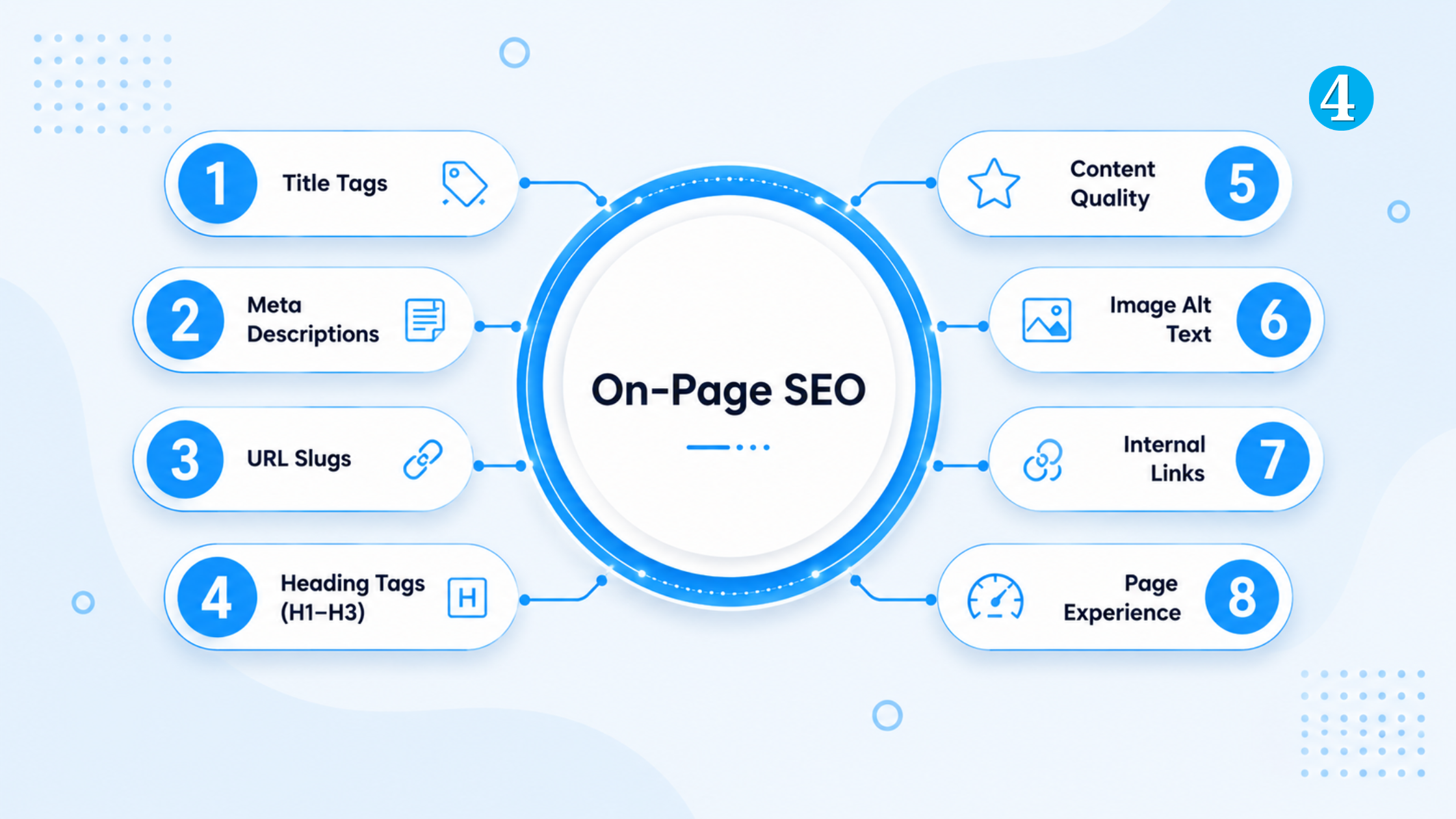
Every on-page SEO checklist covers the same ground: add alt text, write a meta description, use H2 tags. That part is not wrong. What those lists skip is the reasoning — why a page with every box ticked still loses to a messier one that answered the question better.
In this guide, I cover title tags, content, internal links, and technical structure. The difference here is that each section explains which of these actually moves rankings and which ones are mostly busywork.
What is On-Page SEO?
On-page SEO is every optimization you control directly on a page: the words, the HTML structure, the internal links, and the loading experience. It sits apart from off-page SEO (backlinks, brand mentions) and technical SEO (crawling, indexing, site-wide infrastructure).
The line between these three blurs constantly. A canonical tag lives on the page but most practitioners call it technical SEO. The taxonomy does not matter much. What matters: does this page clearly answer the query it targets, and can both Google and a human parse it quickly?
Topic 1: What’s the difference between On-Page vs Off-Page & Technical SEO
Content and Keyword Optimization
Content is where most on-page SEO lives or dies. “Write quality content” is not an instruction. Here is what it means in practice.
Search Intent Matching
Before writing a word, look at what is already ranking for your target keyword. If the top five results are all listicles and you are planning one long guide, you are fighting the format, not just the competitors.
Someone searching “best CRM for small business” wants a comparison with pros, cons, and pricing. Someone searching “what is a CRM” wants a clear definition, not a buyer’s guide. Same topic, opposite pages.
Keyword Placement
- Primary keyword in the title tag, URL, H1, and within the first 100 words
- Secondary keywords distributed naturally across H2s — not forced into every sentence
- Related terms used the way a person would actually write, not pasted from a keyword list
Content Depth and Readability
Keep paragraphs to two or three sentences. Long unbroken text increases bounce rate regardless of how good the information is. Readers decide whether to keep reading within the first few seconds, and a wall of text reads as effort, not value.
Topic 2: How to Match Search Intent for Better Rankings
Topic 3: Content Readability: Writing for SEO and Humans
HTML Tags: Title Tags and Headings
The title tag is the strongest single relevance signal on a page. It is the first thing Google reads and the first thing a searcher sees in results.
Title Tag Rules
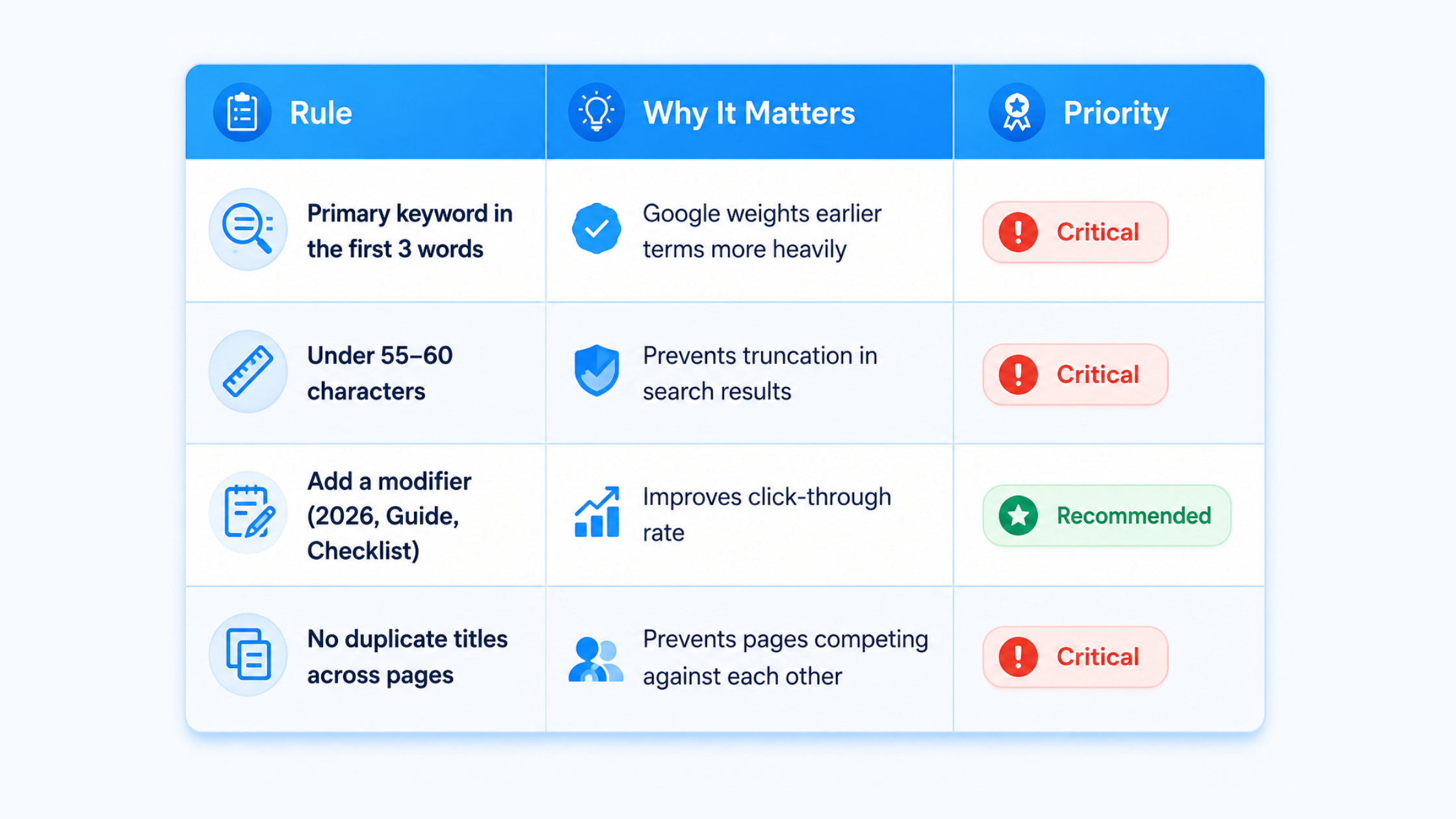
“On-Page SEO Guide: The Complete Checklist for 2026” puts the keyword first, stays under 60 characters, and the word “Complete” signals depth without sounding like clickbait.
Heading Structure (H1 to H6)
- One H1 per page, matching the primary keyword
- H2s break the page into the actual questions a reader has — not arbitrary subtopics
- Never skip levels — do not jump from an H2 straight to an H4
If someone scanned only your H2s, they should be able to tell what the page covers without reading a single paragraph. That is the test.
Topic 4: How to Write SEO Title Tags That Get Clicks
Topic 5: Heading Structure: H1 to H6 Explained for SEO
Meta Tags and Metadata
Meta descriptions are not a ranking factor. Google has said this directly, more than once. What they affect is click-through rate, which affects traffic, which can indirectly affect rankings over time.
Writing Meta Descriptions That Get Clicked
- 150-160 characters — write the sentence first, then trim; do not pad to hit a number
- Include the primary keyword once, naturally
- Give a reason to click: a number, a specific outcome, or the question answered
Weak: “Learn about on-page SEO and how it can help your website rank better in search engines.”
Better: “A 2026 on-page SEO checklist covering title tags, internal linking, and the 5 mistakes that quietly tank rankings.”
Meta Robots and Canonical Basics
The meta robots tag tells search engines whether to index a page and whether to follow its links. Most pages should stay on the default (index, follow). Use noindex for thank-you pages, internal search results, or duplicate filtered views — pages that exist for users but add nothing for search.
Topic 6: Meta Description Best Practices for 2026
Topic 7: Meta Robots Tags Explained: When to Use Noindex
Site Structure
Structure decides whether Google and your readers can find a page in the first place. A brilliant article buried four clicks deep with no internal links pointing to it might as well not exist
URL Structure
- Short, readable, keyword-inclusive — /on-page-seo-guide, not /post?id=4471
- Hyphens to separate words, never underscores
- No unnecessary dates, parameters, or nested category paths
Canonical Tags
If the same or near-identical content appears on more than one URL — a product page accessible through two category paths, for instance — a canonical tag tells Google which version to index. Without it, both pages can end up competing for the same keyword and ranking worse than either would alone.
Site Architecture
Every important page should be reachable within three clicks from the homepage. Flat, well-organized structure helps Google crawl efficiently and helps users. That combination is what on-page SEO is supposed to deliver.
Topic 8: SEO-Friendly URL Structure: Best Practices
Topic 9: Canonical Tags Explained: Fixing Duplicate Content
Internal Linking
Internal linking is one of the most underused levers in on-page SEO. Most sites either skip it or do it badly — stuffing links into paragraphs that have nothing to do with the linked page.
Why It Matters
Internal links spread authority across a site and tell Google how pages relate to each other. In a topic cluster model, this is the entire mechanism: cluster pages link up to the pillar, and the pillar links out to every cluster page. That structure is what Google reads as topical authority.
How to Link Pillar and Cluster Pages
- Every cluster page links back to its pillar at least once — usually in the intro or conclusion
- The pillar links out to every cluster page from the section where that subtopic is introduced
- Cluster pages can link sideways to each other when genuinely relevant — not as decoration
Anchor Text
Anchor text tells Google what the destination page is about. A practical rule: keep roughly 80% of anchors natural and descriptive, and reserve the rest for closer keyword matches.
Weak: “Click here to learn more about internal linking.”
Better: “…read the full guide on internal linking strategy for a complete breakdown.”
Avoid “click here,” “read more,” or “this article.” They give Google zero context about the destination, and they do not help a reader decide whether to click either.
Topic 10: Internal Linking Strategy: A Complete Guide
Topic 11: Anchor Text Best Practices for SEO
Image and Media Optimization
Alt text is a confirmed ranking factor for Google Image Search specifically — not for regular web rankings. The bigger on-page opportunity with images is almost always page speed, not alt text.
Priority Order
- Compress every image before upload — aim under 100kb where the format allows
- Use WebP or AVIF instead of PNG or JPG where supported
- Name files descriptively with hyphens — on-page-seo-checklist.jpg, not IMG_4471.jpg
- Write alt text that describes the image for someone who cannot see it. The SEO benefit follows from doing that job well.
Topic 12: Image SEO: How to Optimize Images for Search
Topic 13: How to Improve Page Speed by Compressing Images
Local SEO On-Page Elements
If your site represents a physical business — a clinic, a restaurant, a service area business — a separate set of on-page signals applies on top of everything above.
NAP Consistency
NAP stands for Name, Address, Phone number. These three details need to match exactly — same formatting, same abbreviations — across your website, Google Business Profile, and every directory listing. “St.” on one platform and “Street” on another is a small inconsistency that erodes local trust signals quietly over time.
Location Pages
Businesses with multiple locations need a dedicated page per location, not one generic “Locations” page listing addresses in a table. Each page needs its own title tag, its own content describing that specific location, and its own embedded map.
Local Schema Markup
LocalBusiness schema gives search engines structured details — address, hours, phone, price range — in a format they can display directly in search results and local map packs, rather than guessing from unstructured text on the page.
Topic 14: Local SEO On-Page Checklist for Multi-Location Businesses
Topic 15: LocalBusiness Schema: Step-by-Step Setup
UX and Core Web Vitals
Google measures three Core Web Vitals as part of page experience: Largest Contentful Paint (how fast the main content loads), Interaction to Next Paint (how quickly the page responds to clicks or taps), and Cumulative Layout Shift (whether elements jump around as the page loads).
A page can have a perfect title tag, ideal keyword placement, and clean heading structure and still underperform if it takes six seconds to load or the “Buy Now” button shifts position as ads render in. UX signals are on-page ranking factors, not a separate technical concern.
Mobile-First Indexing
Google evaluates the mobile version of a page first, not desktop. Every on-page element — font size, button spacing, image scaling — needs to work on a small screen, with desktop treated as the secondary experience.
Topic 16: Core Web Vitals Explained: LCP, INP, and CLS
Topic 17: Mobile-First Indexing: What It Means for Your Site
Schema and AI Search Readiness (GEO)
Brands cited inside Google’s AI Overviews get meaningfully more traffic than brands left out entirely. Schema markup is one of the clearest levers for becoming eligible for those AI-generated answer boxes.
- FAQ schema on any page with question-and-answer content
- Article schema on blog posts, to surface author and publish date
- Review schema on product or service pages
- Validate everything with Google’s Rich Results Test before publishing — invalid schema is worse than no schema
Topic 18: Schema Markup for Beginners: Complete Setup Guide
Topic 19: How to Get Your Content Featured in AI Overviews
Common On-Page SEO Mistakes That Hurt Rankings
Keyword Stuffing
Repeating the exact keyword in every sentence does not help rankings anymore — it hurts readability, which hurts time-on-page, which is the metric that correlates with rankings now.
Duplicate Title Tags
When two pages share a title tag, Google has to guess which one should rank for the shared keyword and often picks neither. This is common on e-commerce sites where category and filter pages inherit the same template title.
Ignoring Search Intent
This is usually the highest-impact fix on the list. A technically clean page that answers the wrong type of question — a product page where the searcher wanted a comparison guide — will underperform no matter what else is optimized.
Internal Links That Go Nowhere Useful
Linking to your homepage from every blog post because “more internal links is better” wastes link equity. Every internal link should point somewhere specifically relevant to the sentence it is in.
Topic 20: 10 On-Page SEO Mistakes (and How to Fix Each One)
How to Audit Your Own Page (5-Minute Checklist)
Run through this before publishing anything, or when an existing page stalls in rankings:
- Does the title tag include the primary keyword in the first 3 words, under 60 characters?
- Does the H1 match the title tag’s intent, and is there only one H1?
- Is the primary keyword in the first 100 words of body content?
- Does every H2 answer a real question a reader would ask?
- Are there at least 2-3 internal links with descriptive (not “click here”) anchor text?
- Have all images been compressed and given descriptive alt text?
- Does the page load in under 2.5 seconds on mobile (check with PageSpeed Insights)?
Content Refresh Check
A page that ranks today won’t rank forever. Competitors update their content. Statistics go stale. Search intent shifts. Sometimes rankings drop not because of backlinks or technical SEO—the page simply stopped being the answer people needed.
Before you publish new content, stop and ask:
- Are your statistics still current?
- Did competitors cover something you missed?
- Do your links still work?
- Does the page still match what people are actually searching for?
Updating an old page is often faster than creating a new one. Add fresh data, fill content gaps, and improve weak sections. In many cases, that’s enough to bring rankings back without starting from scratch.
Free tools for this: Google Search Console for impressions and rankings, PageSpeed Insights for Core Web Vitals, and Google’s Rich Results Test for schema validation.
Topic 21: Free SEO Audit Tools: What to Use and When
E-E-A-T: Why Author Authority Matters On-Page
Google’s March 2026 core update leaned harder into E-E-A-T than any update before it — Experience, Expertise, Authoritativeness, and Trustworthiness. This is not a separate checklist item anymore. It runs through how content gets evaluated at every level.
Author Bio
A visible author byline with a real bio — credentials, relevant experience, a link to their other work — tells Google and readers that a qualified person stands behind the content. Anonymous or generic “Admin” bylines are a quiet red flag, especially on YMYL topics like health, finance, or legal advice.
Experience Signals
First-hand experience reads differently from secondhand summary. “I tested this for three months” carries more weight than “studies suggest this works” — both can be true, but only one demonstrates the kind of experience Google is now explicitly trying to reward.
Why This Matters More in 2026
As AI-generated content floods the web, E-E-A-T has become one of the few remaining signals that is genuinely hard to fake at scale. A page with a real author, real experience, and specific detail is harder for a generic AI-written competitor to match. That is exactly why it is worth the effort.
Topic 22: E-E-A-T Explained: How to Build Author Authority
Frequently Asked Questions About On-Page SEO
What is the difference between on-page and off-page SEO?
On-page SEO covers everything within direct control on a page — content, titles, headings, internal links, images. Off-page SEO covers external signals that happen elsewhere: backlinks, brand mentions, social shares.
Does keyword density still matter?
Not the way it used to. Modern on-page SEO is built around semantic relevance and intent matching, not repetition counts. Forcing a keyword into every sentence usually does more harm than good now.
What is the single highest-impact on-page fix?
Fixing search intent mismatch, almost always. A page can have a perfect title tag and ideal heading structure and still fail to rank if it answers the wrong kind of question for what the searcher actually wants.
Do Core Web Vitals really affect rankings?
Yes. Google explicitly includes page experience signals — loading speed, interactivity, visual stability — in ranking. A slow, unstable page can underperform even with strong content and keyword work.
How long does on-page SEO take to work?
On-page SEO changes usually start showing impact within 2 to 8 weeks, depending on your website authority, indexing speed, and competition. Google needs time to recrawl and reassess updated pages.
Can on-page SEO alone rank a page?
Yes, in low to medium competition keywords, strong on-page SEO alone can rank a page. However, for competitive keywords, you will also need backlinks and topical authority to sustain rankings.
Do headings directly affect rankings?
Headings do not directly act as a ranking factor, but they strongly influence content structure, readability, and semantic understanding, which helps Google interpret the page better and indirectly improves rankings.
Final Thoughts
None of this is complicated in isolation. Title tags, internal links, image compression — each one takes minutes. What makes on-page SEO hard is doing all of it consistently, on every page, without skipping the boring parts because they do not feel as important as the content itself.
Start with whichever section above feels most obviously broken on your own site. For most people, that is either search intent or internal linking. Fix that first, measure the change in Search Console, then move down the list.
2 thoughts on “What Is On-Page SEO? A Complete Guide to Optimizing Web Pages”
Comments are closed.